Threat Catalog Update — Behaviors Now Show Linked Detection Primitives
Threat Catalog Update — Behaviors Now Show Linked Detection Primitives
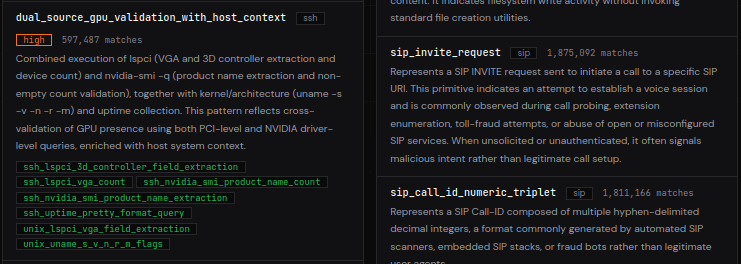
The threat detection catalog just got a structural improvement. Attack behaviors now display their underlying detection primitives as clickable pill tags directly in the catalog view.
What Changed
Every behavior entry in the catalog now shows which primitives compose it. These appear as small clickable tags beneath the behavior description. Clicking a tag takes you to that primitive's detail page, where you can see every IP that matched it, the protocol it applies to, and the average confidence level of matches.
Previously, the catalog listed behaviors and primitives in separate columns with no visible connection between them. You could browse each independently, but there was no way to see which primitives contributed to a given behavior without navigating to the behavior's detail page.
Now that relationship is visible at a glance.
How Behaviors and Primitives Relate
SikkerAPI's detection engine works in two layers:
Detection primitives are the low-level rules. Each primitive matches a single observable pattern in honeypot traffic — a specific command executed, a credential format attempted, a query structure used. Primitives are protocol-specific and binary: an IP either triggered the primitive or it didn't.
Behavioral patterns are higher-level classifications that combine one or more primitives into a meaningful attack description. A behavior like credential stuffing might be composed of several primitives: default credential attempts, rapid authentication failures, and username enumeration patterns. Behaviors carry a severity level (low, medium, high, or critical) that primitives do not.
The new pill tags make this composition visible. When you see a behavior tagged with three primitives, you know exactly which low-level detection rules fired to produce that classification.
Catalog Search Includes Primitives
The catalog search bar now matches primitive names within behaviors. If you search for a specific primitive name, behaviors that include that primitive will appear in the results alongside the primitive itself.
This works both ways — searching for a behavior name still returns the behavior, and searching for a protocol or severity keyword still filters as before. The primitive matching is additive.
Why This Matters for Threat Research
If you're investigating a specific IP on SikkerAPI and see it flagged with a behavior, the primitive tags tell you what the honeypots actually observed. Instead of a single label, you get the decomposition: which specific patterns in the raw traffic triggered the classification.
For teams building detection rules or firewall policies, the primitive-level detail is often more actionable than the behavior label. You can click through to a primitive's page, see the IPs that matched it, and decide whether that specific pattern warrants a block rule in your environment.
The detection catalog lists all active behaviors and primitives across the 16 protocols monitored by SikkerAPI's global honeypot network. Every entry links to a detail page with the full list of observed IPs, match counts, and confidence statistics.
Browse the updated catalog at https://sikkerapi.com/threats/catalog.
Comments
No comments yet. Be the first to share your thoughts!